BRIEF
Transforming the XR glasses unboxing experience from a static lecture into an adaptive, multimodal conversation.
- 6 weeks -
ROLE
Interaction / Visual Designer
Frontend Engineer (C#)
COLLABORATOR
Motion Designer
UX Engineer
TOOLS
Figma, Unity (C#), GenAI (Gemini)
KEY CONTRIBUTION
End-to-end OOBE interaction & visual design for XR glasses;
Front-end development in Unity on android devices
Implementation: interactive 3D animation; real-time input feedback; state machine
Multimodal Flow: Watch how the system auto-advances steps when the user successfully performs the physical gesture on the device
The Challenge: Moving Beyond the Checklist
Despite the futuristic nature of smart glasses, the current Out-of-Box Experience (OOBE) often relies on legacy patterns. In analyzing market leaders like Meta Ray-Ban, we observed a strict reliance on mobile-first, linear checklists.
While this approach is functional, it offers minimal in-situ coaching on the device itself. Users are forced through a rigid sequence with limited adaptivity, making the experience feel like reading a digital manual.
Key Takeaway: The current standard is clear but non-conversational. This highlighted a distinct opportunity to differentiate our product by prioritizing adaptivity and immersion—shifting from a passive lecture to an active partnership.

How might we make the first 10 minutes of using smart glasses as exciting as the hardware itself?
The Concept: Learning is Social
Drawing on Lev Vygotsky’s psychological framework that learning is inherently social, we reimagined OOBE not as a tool delivery, but as a partnership.We proposed a Conversational, Adaptive OOBE. Instead of forcing users through a rigid loop, an AI Coach guides the setup dynamically.
Adaptive Flow: The system adapts to the user’s pace. Users can skip ahead, ask for clarification, or dive deeper.
Intent Recognition: Users can ask "How do I control volume?" at any time, and the system intelligently routes them to the correct interactive tutorial.
.png)
Interaction Architecture
The system orchestrates multimodal inputs to create a seamless feedback loop:
1. Voice (Gemini): Handles natural language queries and conversation.
2. Visual (Phone): Provides visual cues and 3D motion feedback.
3. Gesture (Glasses PUI): Physical inputs on the glasses trigger state changes.
Example Flow: If a user goes off-topic (e.g., "What's the weather?"), the AI provides a quick answer but gently nudges the conversation back to the tutorial context, maintaining flow without breaking immersion.
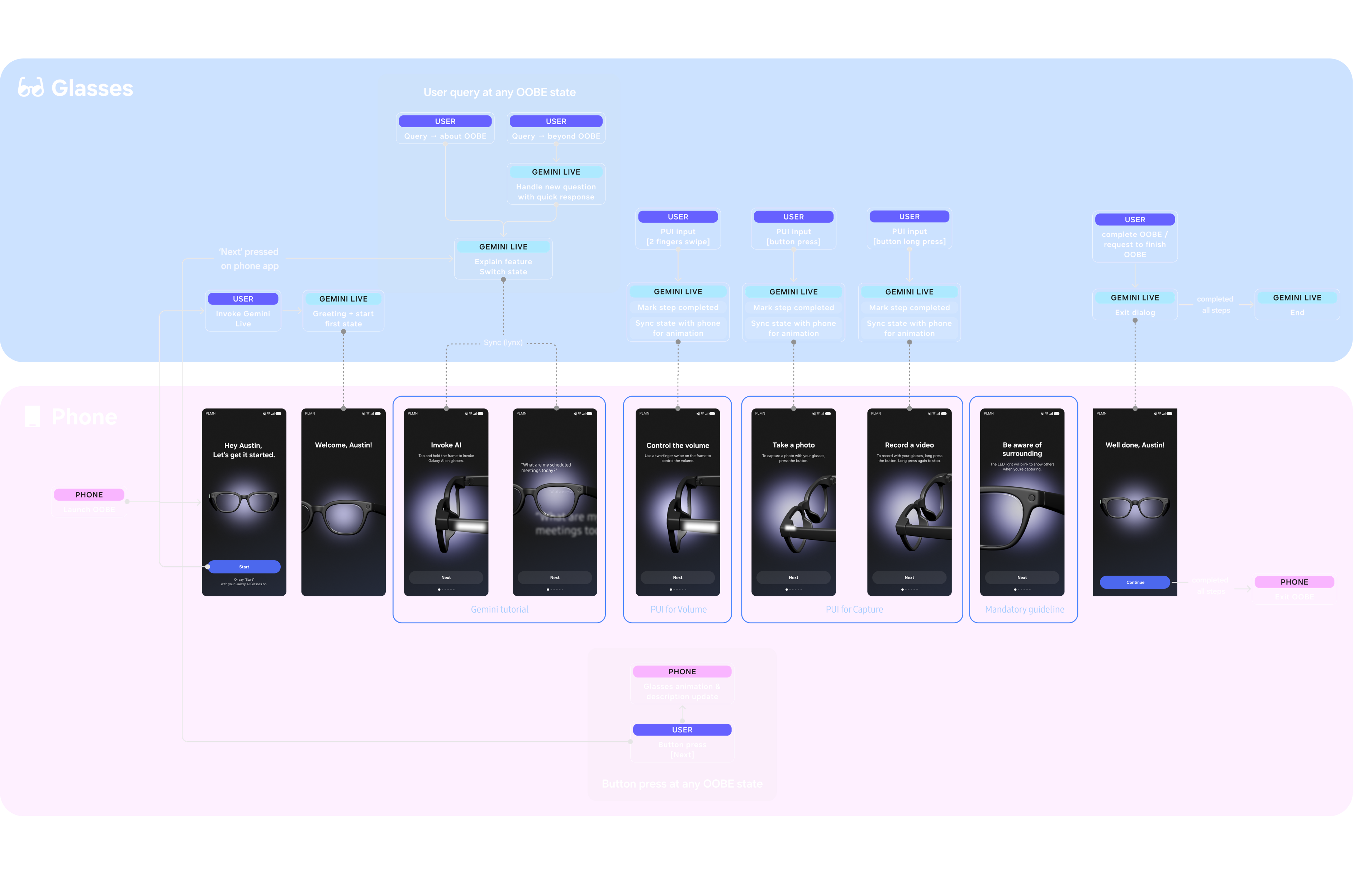
System Architecture: Orchestrating the relationship between Gemini (Conversation), Phone (Visuals), and Glasses (Physical Input).
Visual Design & Prototyping
To match the immersive nature of the hardware, I moved away from 2D screens to a 3D spatial interface.
- Spatial Visuals: I utilized particle systems and VFX combined with motion graphics to highlight gesture indications, creating a "tech-savvy" aesthetic.
- Feedback Loops: Visuals on the phone sync perfectly with physical actions on the glasses. When a user successfully performs a gesture, the system provides immediate visual and audio reinforcement ("Great, now let's move on").
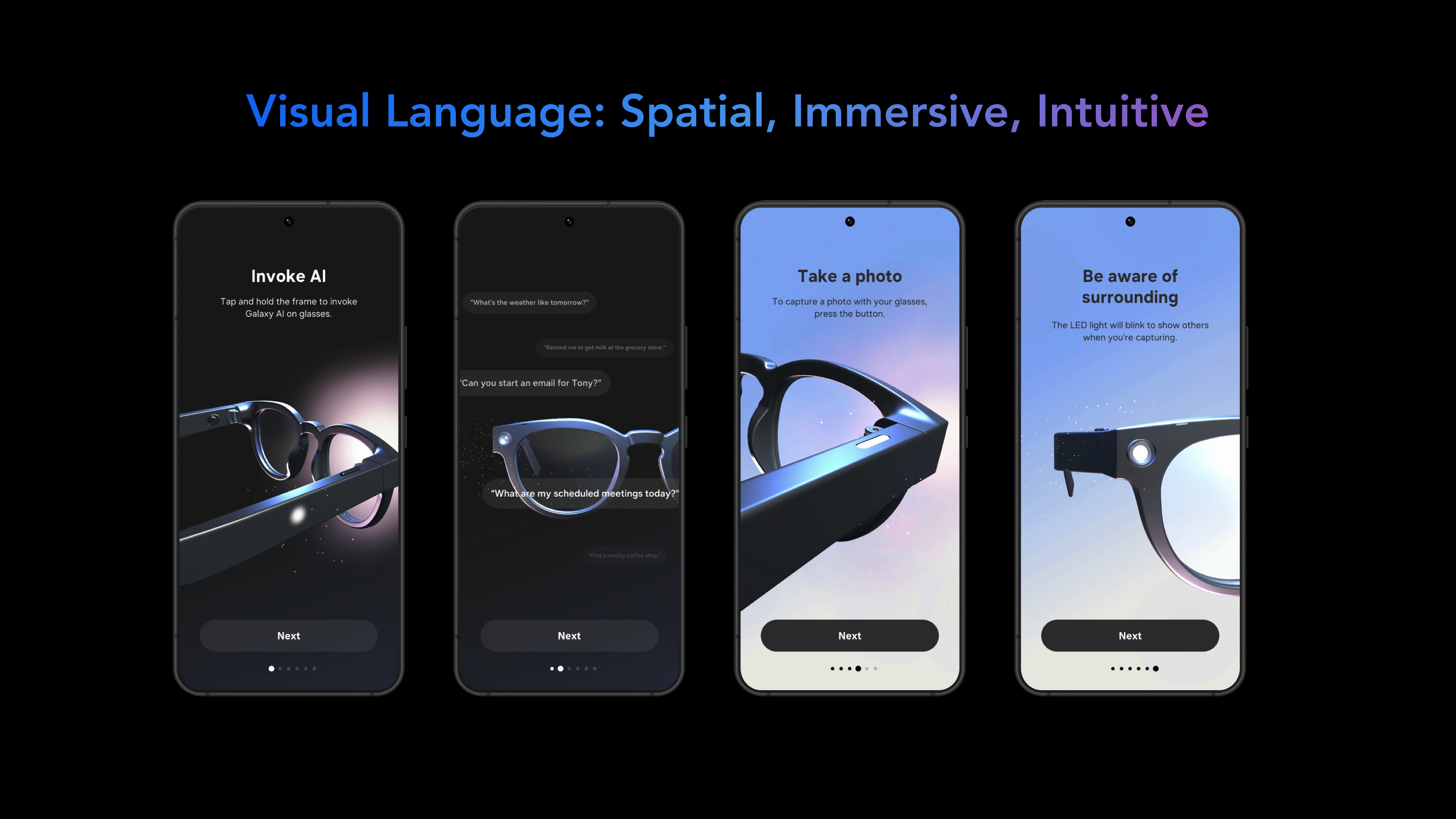
Technical Execution
I was responsible for building the high-fidelity prototype and frontend logic in Unity.
State Machine: Built a robust controller to map AI responses to specific tutorial steps.
Input Simulation: Developed a system to simulate PUI (Physical User Interface) inputs within Unity to test gesture triggering.
Integration: Collaborated with engineering to connect the Unity frontend with the backend AI and device communication layers, ensuring low-latency responses between the user's voice and the visual UI.
Unity Implementation: Using particle systems and 3D motion to visualize voice activity and gesture completion.
.png)
Non-linear, "human" onboarding experience for XR smart glasses.
Conversation Driven Tutorial
Users can query AI anytime; coach jumps to the step, provides specific explanation, or deepens a sub‑step.
User PUI input
Teach core PUI gestures on the actual device (swipe/tap/press). PUI triggers system feedback (earcon audio/visual) on devices.
Interactive Visual
2D gesture graphics + particle VFX for focus & transitions. Visual polish positions us above competitors.
Status: Patent-Pending
Due to the novel approach of orchestrating multimodal inputs (Voice + Visual + PUI) for hardware onboarding, this work is currently Patent Pending.